
Webflow just dropped massive platform updates! Derek Siu breaks down the new pricing structure, Next-Gen CMS rollout, and native AI code components.



Keeping up with Webflow’s rapid development cycle can feel like a full-time job. Between foundational workflow changes and massive shifts in how sites are priced, there is a lot to digest.
In this breakdown, Sydney-based Webflow developer Derek Siu unpacks the most significant updates and feature rollouts made to the platform between April 1st and June 14th. Whether you're a freelance visual designer, an agency owner, or an enterprise developer, here is what you need to know about Webflow’s evolving ecosystem.
The highly anticipated Next-Gen CMS rollout is finally complete. Previously restricted to enterprise-tier accounts, these upgrades are now universally accessible across all workspaces.
For developers who frequently write inline scripts or embed style tags, the native Webflow code editor just received a modern facelift.
Instead of typing out raw text blockages, the updated code embed window looks and behaves like a professional desktop IDE (such as VS Code or Sublime Text).
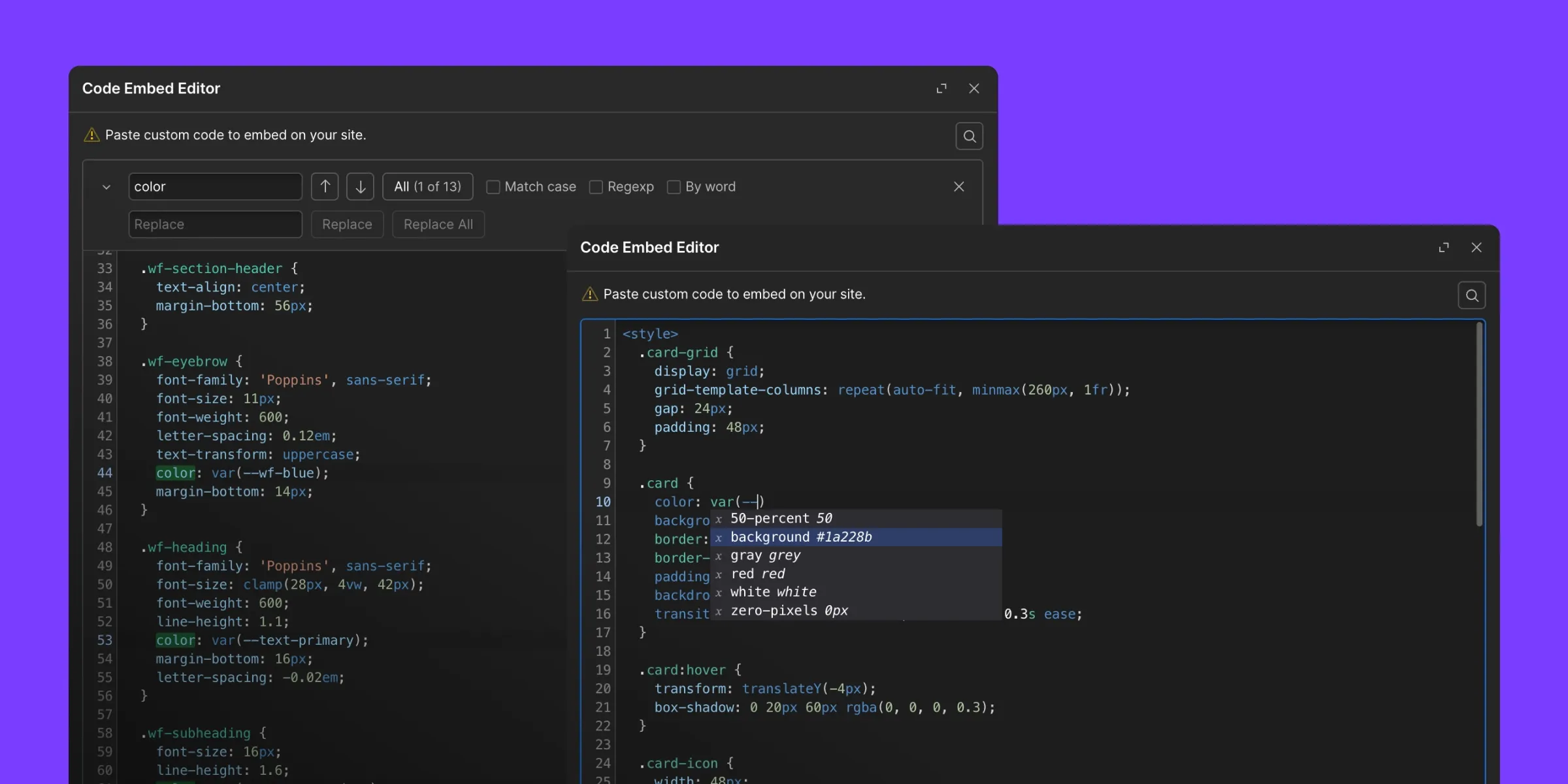
It now features intelligent code autocomplete suggestions, proper syntax color-coding, and automatic tag closure (e.g., typing <style> instantly auto-generates the closing </style> tag).
Navigating your path into the official Webflow Experts partner ecosystem can be a long process, requiring multiple site submissions and thorough code inspections. To bridge that gap for rising creators, Webflow introduced Webflow Foundations.

This is a newly established partner tier positioned just beneath the traditional program. It features a streamlined application process, allowing newer freelancers and agencies to get immediate access to the resource hub, exclusive community forums, and a built-in dashboard marketplace to manage affiliate tracking and client site-plan transfer commissions.
Webflow’s push into visual AI development has taken a massive step forward with AI Code Components.
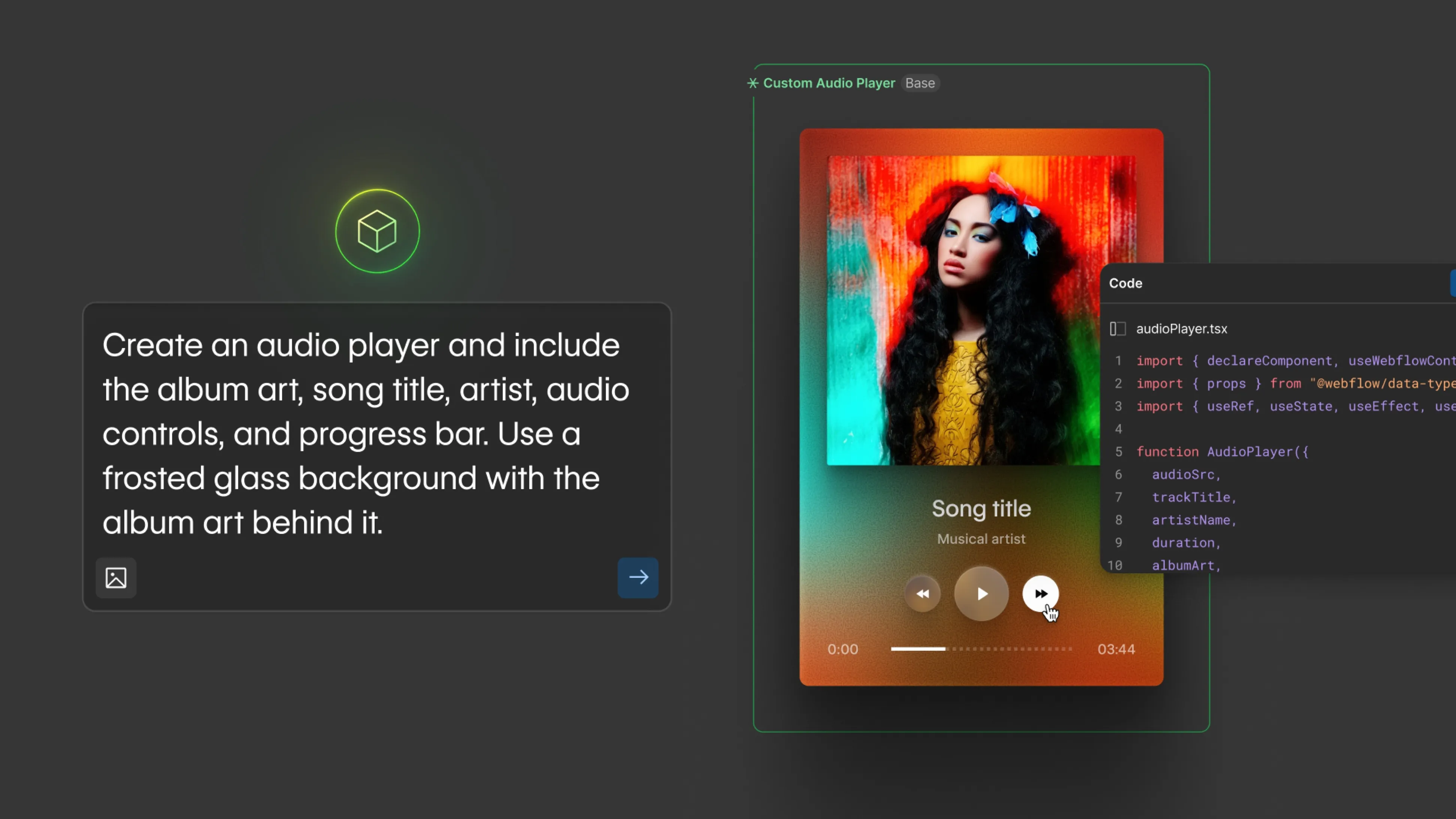
Inside the native components panel, you can now launch a direct generative AI prompt box. By inputting descriptive prompts (for instance, asking the engine to "Make me a responsive music player with an accordion playlist drop-down"), Webflow will program, style, and structure the functional UI component for you entirely from scratch in a matter of minutes.
Webflow has restructured its standard site-plan tiers, dropping the legacy basic/CMS/business layout in favor of updated package inclusions.
The new Premium Plan ($25/mo) effectively replaces the old standalone CMS tier. The core changes to monitor moving forward are tighter bandings on your monthly traffic bandwidth usage alongside the introduction of allocated native AI usage credits.
Beyond the flagship feature announcements, several quality-of-life adjustments have rolled out to the designer view canvas:
32x32px and 256x256px dimensions. You can now upload a single high-resolution image file (e.g., 500x500px), and Webflow automatically scales it down to handle both favicon and web clip configurations flawlessly.With the inclusion of custom MCP bindings to engines like Anthropic Claude and Webflow’s own native component generator, the conversation surrounding AI automation is growing rapidly.
However, as Derek highlights, true web design remains rooted in clean, scalable logic. While AI can eliminate the manual labor of writing raw code snippets, debugging, optimizing, and scaling complex layouts requires a firm understanding of fundamental front-end principles. If you do not understand how elements interact inside the box model, prompting alone will leave you stuck in endless correction loops.
Want to learn Webflow development and freelance business fundamentals from the ground up? Check out Derek’s comprehensive Webflow Beginner Masterclass.
For a live look at the new code editor interface, the canvas panning tools, and a real-time test of the AI component music player script, watch the full video tutorial directly on YouTube:
👉 Watch: Webflow's Biggest Changes Since April

